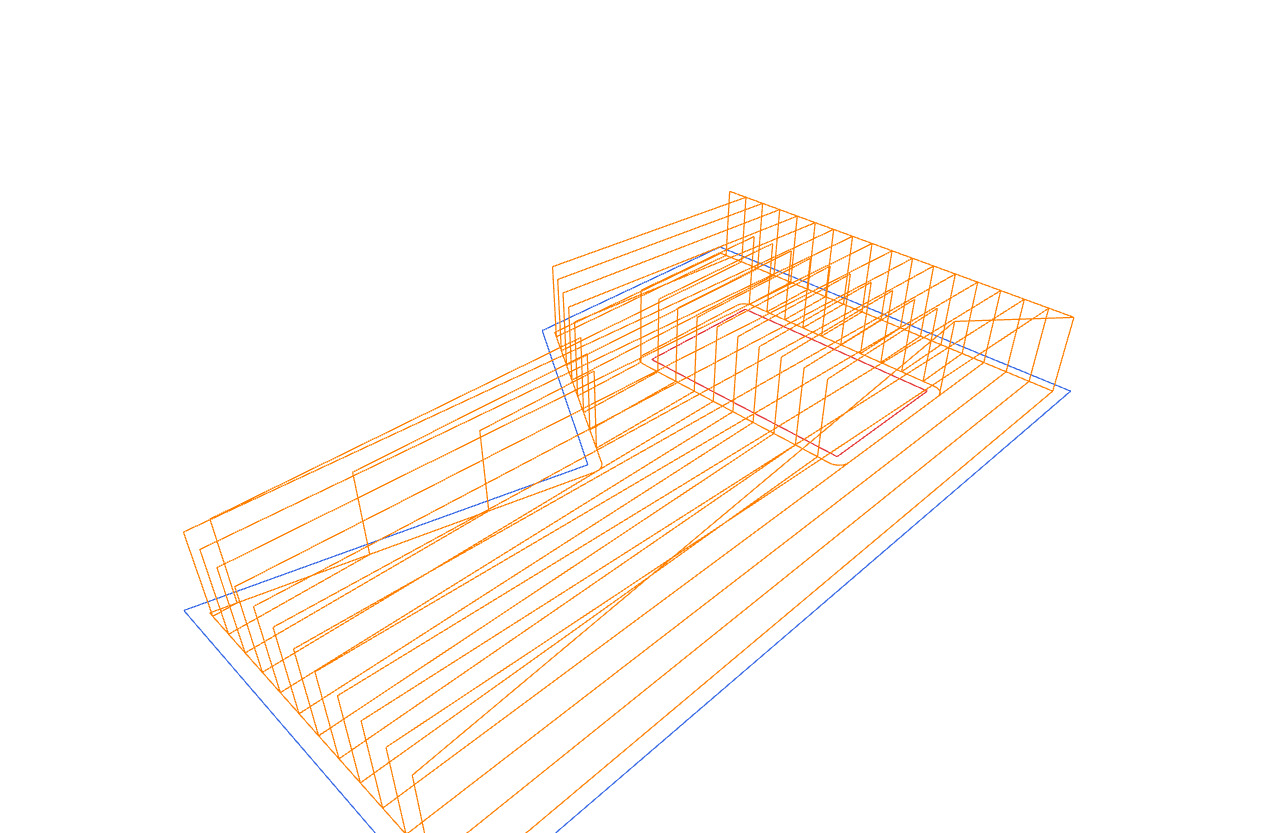
from compas_viewer import Viewer

from compas.geometry import Polyline
from compas_cnc import toolpath_2d_hatch
from compas_cnc.tools import FLAT_3MM
from compas_cnc.tools import add_tool_slider

tool = FLAT_3MM

boundary = Polyline([[0, 0, 0], [90, 0, 0], [90, 55, 0], [55, 55, 0], [40, 30, 0], [0, 40, 0], [0, 0, 0]])
hole = Polyline([[60, 12, 0], [78, 12, 0], [78, 40, 0], [60, 40, 0], [60, 12, 0]])

hatch = toolpath_2d_hatch(
    boundary,                # closed Polyline / Polygon -- outer boundary
    spacing=tool.diameter,   # float > 0 -- stepover between hatch lines
    angle=0.0,               # float radians -- hatch line direction
    holes=[hole],            # None | list of closed rings -- islands the fill must avoid
    radius=tool.radius,      # float -- cutter comp (0 = tool centre rides the edge)
    z=None,                  # None (= geometry plane) | float -- fill plane
    safe_z=None,             # None (auto) | float -- plunge/retract height
    contour=True,            # True | False -- finishing pass around each wall
    direction="conventional",  # None (fast zig-zag) | "climb" | "conventional" (one-directional)
    depth=0.0,               # float -- layered roughing depth below z (0 = single flat pass)
    step=None,               # None | float > 0 -- layer depth when depth > 0
)
print(hatch)

# =============================================================================
# Visualization
# =============================================================================

viewer = Viewer()
viewer.scene.add(boundary, linecolor=(0.2, 0.4, 0.9), name="boundary")
viewer.scene.add(hole, linecolor=(0.9, 0.2, 0.2), name="hole")
viewer.scene.add(hatch.path, linecolor=(1.0, 0.5, 0.0), name="toolpath")
add_tool_slider(viewer, tool, hatch.path, facecolor=(0.7, 0.7, 0.75), opacity=0.6)
viewer.show()